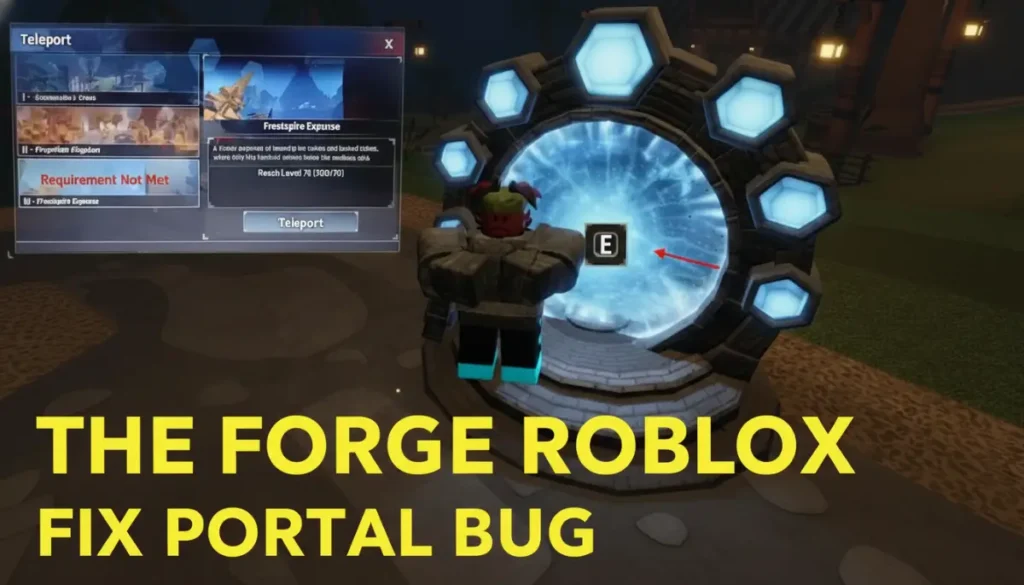
The Forge Roblox Fix Portal Bug: Many players in The Forge Roblox have trouble with the portal tool. This tool lets players go to the next island, like from Level 2 to Level 3 or Level 3 to Level 4. The portal does not work even after players reach the right level. This stops them from moving ahead in the game.
The Forge Roblox: Fix Portal Bug
What Is the Portal Bug?
The portal bug happens when players try to go between islands. For example, after level 10 in Stonewake’s Cross (Level 2 area), players want to go to Forgotten Kingdom (Level 3). The tool shows in the inventory. But it does not list the next island or turn on when placed. The same problem happens at level 70 to reach Frostpire Expanse (Level 4). This comes from server types, missed rewards, or wrong placement.
Why Does the Portal Bug Happen?
A few things make the portal not work. First, players need the exact level, like level 10, and all quests from NPCs like the Wizard or Sensei Moro. Second, private servers do not always update player progress right. This leaves players in the old world. Third, putting the portal on bumpy ground or busy spots stops it from working. Game updates fixed some close problems, like level shows, but this one stays for some players.
How to Check Your Requirements
Before you use the portal, check these steps. Press T for the Index menu and get all rewards. They give experience points and tools. Make sure your level fits the island need. For Level 3, you need level 10 after Stonewake quests. Talk to the Wizard NPC by the tower in Stonewake’s Cross for the portal tool if you do not have it. These steps get your game ready to travel.
Also Read: The Forge New Mailbox Update: How to Track & Get Free Rewards
Step-by-Step Fix Instructions
Use these steps to fix the portal bug and go to the next island.
- Join a Public Server: Go from private servers to a public one on the server list. Public servers update progress better.
- Claim Rewards and Talk to NPCs: Press T for Index, get all XP, then see the Wizard or Sensei Moro again.
- Prepare the Hotbar: Pick the portal tool from the hotbar, not full inventory. Drop extra items if full.
- Place the Portal Correctly: Look for flat, clear ground. Stay away from water, hills, ores, or enemies. Place it and wait 30 seconds. Pick the next island like Forgotten Kingdom.
- Relog if Needed: Leave the game and join the same public server again. This updates your data.
Tips to Avoid the Bug in the Future
Stop portal problems with these steps. Get experience from ores, quests, and enemies before you travel. Use public servers for level changes. Private servers help farm later. Look at the Fandom wiki or Discord for new fixes. Developers add patches often, like better server work in 2026. Check Index each day for boosts.